
Zeki Assistant
Zeki Assistant is the AI chat assistant built into every page of Dengage. It is the conversational side of Zeki AI, the AI layer of the platform. Open it from the top bar and ask for what you need, the way you would ask a colleague.
Zeki answers product questions from the Dengage Knowledge Base and turns your campaign and segment data into clear insights. It drafts on-brand content, builds segments from a plain-language description, and can set up a complete campaign for you. You review every result before anything goes live, and you never leave the page you are working on.
Zeki Assistant at a Glance
| Capability | Ask Zeki to... | What you get |
|---|---|---|
| Get instant answers | Explain a feature or walk you through a task | A step-by-step answer, links to related Knowledge Base articles, and a shortcut to the right screen |
| Analyze campaigns and segments | Report on campaign performance or segment sizes | A summary built from your own account data, with tables, key takeaways, and a link to the full report |
| Generate content | Write campaign copy or message variations | Ready-to-edit content in your brand's tone, opened in the content editor for review |
| Build a segment | Turn a one-sentence audience description into a segment | A segment definition with the matching filters, opened in the segment editor for review |
| Set up a single channel campaign | Prepare a campaign from a channel, audience, content, and timing | A campaign flow prepared in the campaign editor, ready to review and publish |
Open Zeki Assistant
Zeki Assistant is available on every page of Dengage, including flow, content, and report screens.
- Select the Zeki Assistant icon in the top bar.
- The chat panel opens on the right side of the page you are on.
- Keep working on the page while the panel stays open.
Use the controls in the panel header to adjust the panel:
| Control | What it does |
|---|---|
| Expand / Collapse | Switches between the compact panel and the extended view. The wider view makes data tables and long breakdowns easier to read. |
| + | Starts a new session. Zeki clears the current chat after you confirm. |
| × | Closes the panel. Your place on the page stays as it was. |
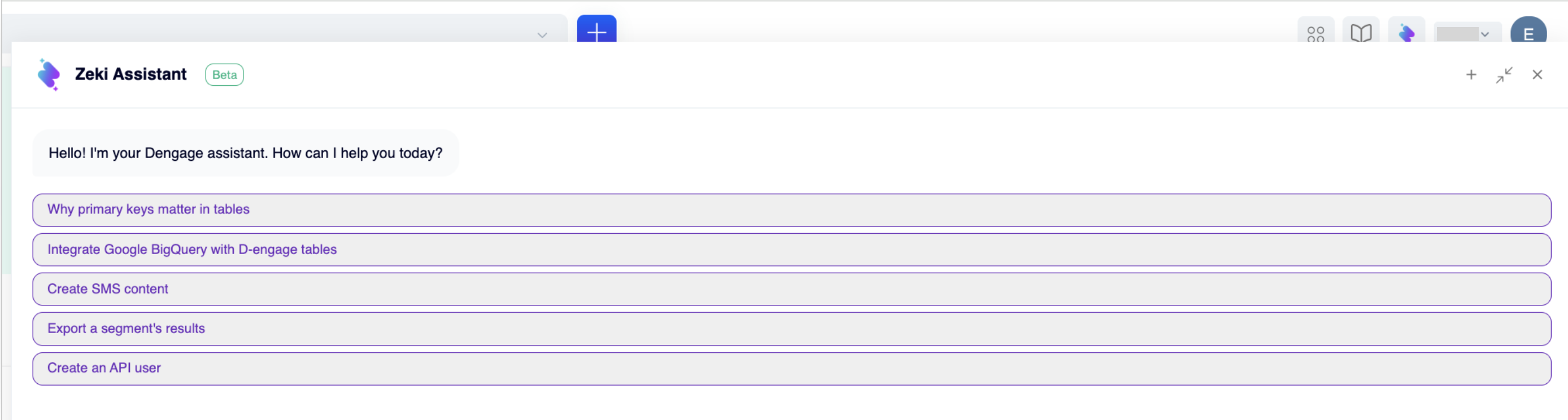
Zeki Assistant - Extended view with suggested questions
Start a Conversation
When the panel opens, Zeki greets you and lists suggested questions based on what users ask most often. Select a suggestion, or type your own request in the message box. Zeki replies in the panel with clear, step-by-step guidance.
A few things to know about how Zeki works:
- It keeps context. Ask follow-up questions, refine your request, or switch topics. Zeki remembers what you are working on within the session.
- It shows its work. When Zeki reads your account data, you see each step as it happens, such as Reading channel report…. Every insight stays traceable.
- It links the source. Answers that draw on the Knowledge Base end with a Documentation list, so you can open the related articles in one step.
- It takes you there. When a relevant screen exists, Zeki offers to open it. Select Yes, take me to land on the right report or settings page.
- It asks before it acts. Before Zeki generates content or prepares a campaign, it shows a short plan and waits for your approval.
- You can rate every answer. Use the thumbs up or thumbs down icon under a reply to rate it.
What Zeki Assistant Can Do
Get Instant Answers
Ask product questions right where you work. Zeki Assistant searches the Dengage Knowledge Base and answers with accurate, contextual guidance. Each answer comes with links to related Knowledge Base articles for when you want to go deeper. When the task has a screen in the platform, a shortcut card at the end of the answer takes you straight there.
New team members get help at the moment they need it, without leaving the platform. The learning curve gets shorter for everyone.
Try asking:
- "How do I create an API user?"
- "How do I export a segment's results?"
- "How do I integrate Google BigQuery with Dengage tables?"
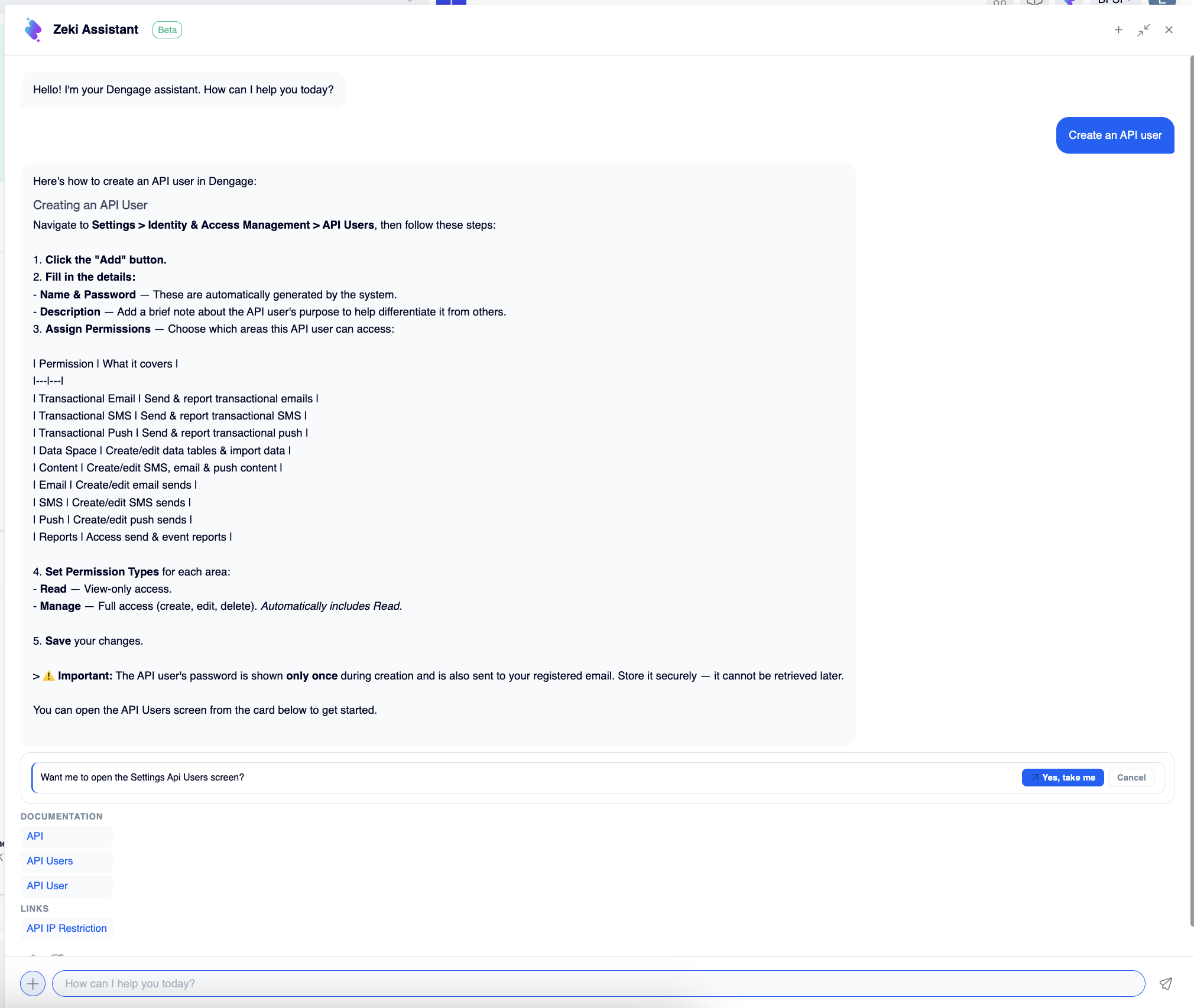
Ask how-to questions right where you work, like how to create an API user
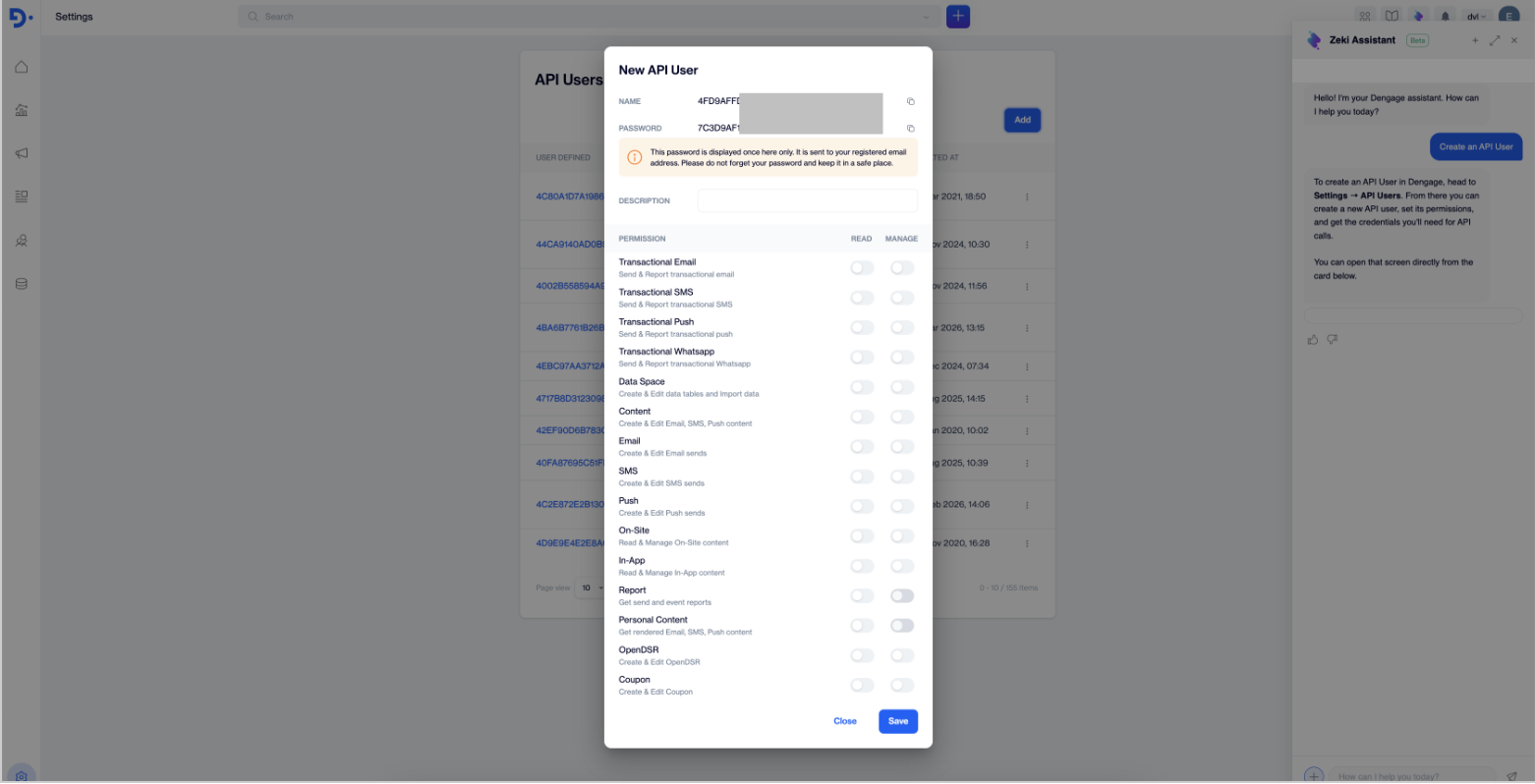
Clear steps, and one click takes you straight to the API Users screen
Analyze Campaigns and Segments
Zeki Assistant connects directly to your campaign and segment data. Instead of opening reports one by one, ask a question in plain language and get a readable summary.
A typical answer includes:
- An overview table with the key metrics, such as sent, opened, clicked, and bounced counts and rates
- A per-campaign or per-segment breakdown
- Key takeaways, such as a campaign with an unusual bounce rate or a segment whose snapshot needs recalculating
- A shortcut card to the full report screen, when one exists
Zeki builds every answer from your actual account data, not from generic guidance. It reads the relevant channel reports and segment lists at the moment you ask, and you can watch it happen in the chat.
Try asking about campaigns:
- "How did my SMS campaigns perform last month?"
- "How did my email campaigns perform over the last 3 months?"
- "Which of my campaigns had the highest bounce rate recently?"
- "Compare this month's campaign performance with last month's. What changed?"
- "Which channel performed best for me last quarter: email, SMS, or push?"
Try asking about segments:
- "What are my largest segments and how many contacts are in each?"
- "How many contacts are in my [segment name] segment?"
- "Check the contact counts of my most important segments."
- "Which of my segments has the highest conversion rate?"
Zeki also answers questions about automations, channel statistics, dashboards, contacts, data tables, and RFM analysis. For the full list of what you can ask, see Data Insights.
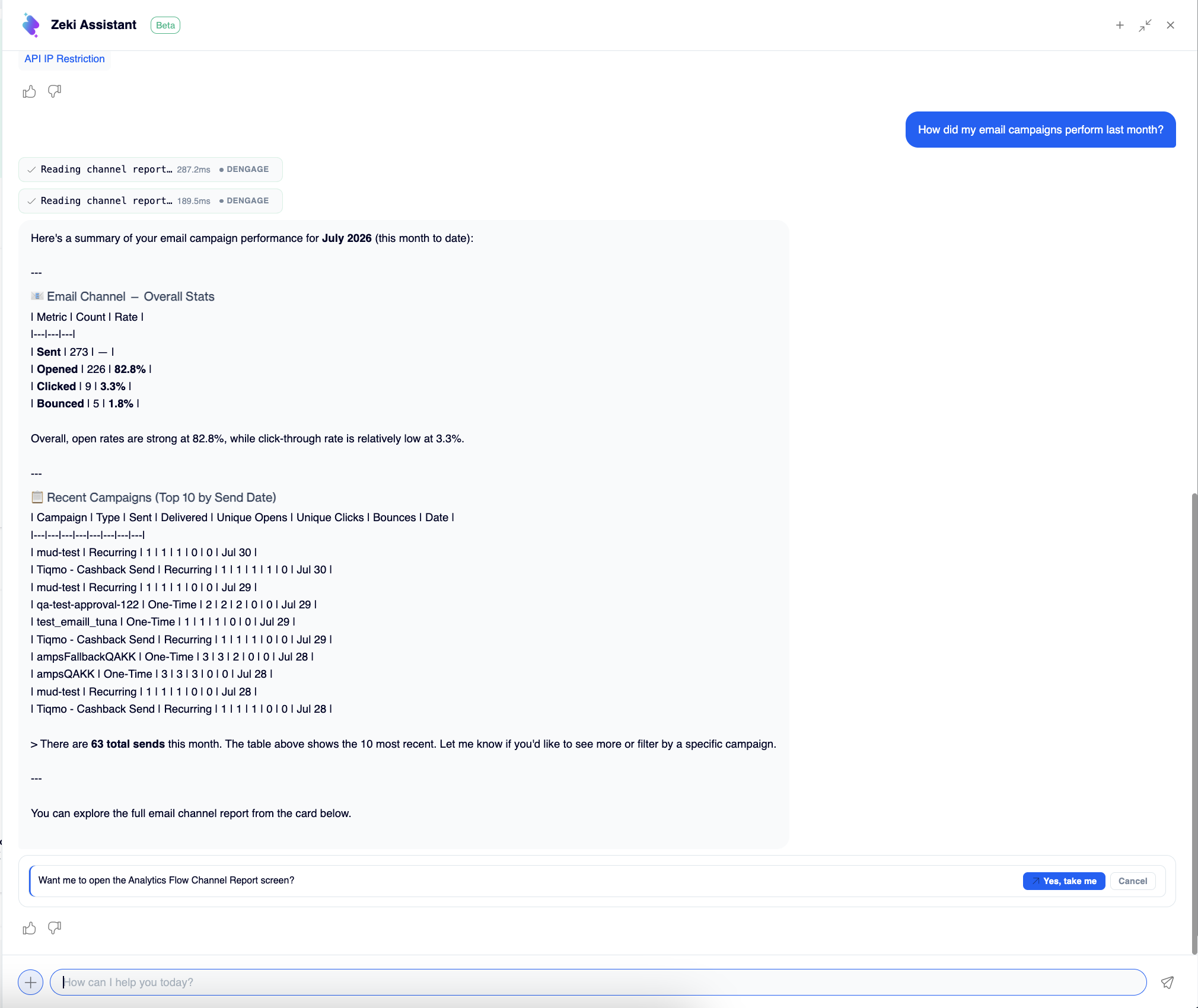
A campaign question, answered from your account data
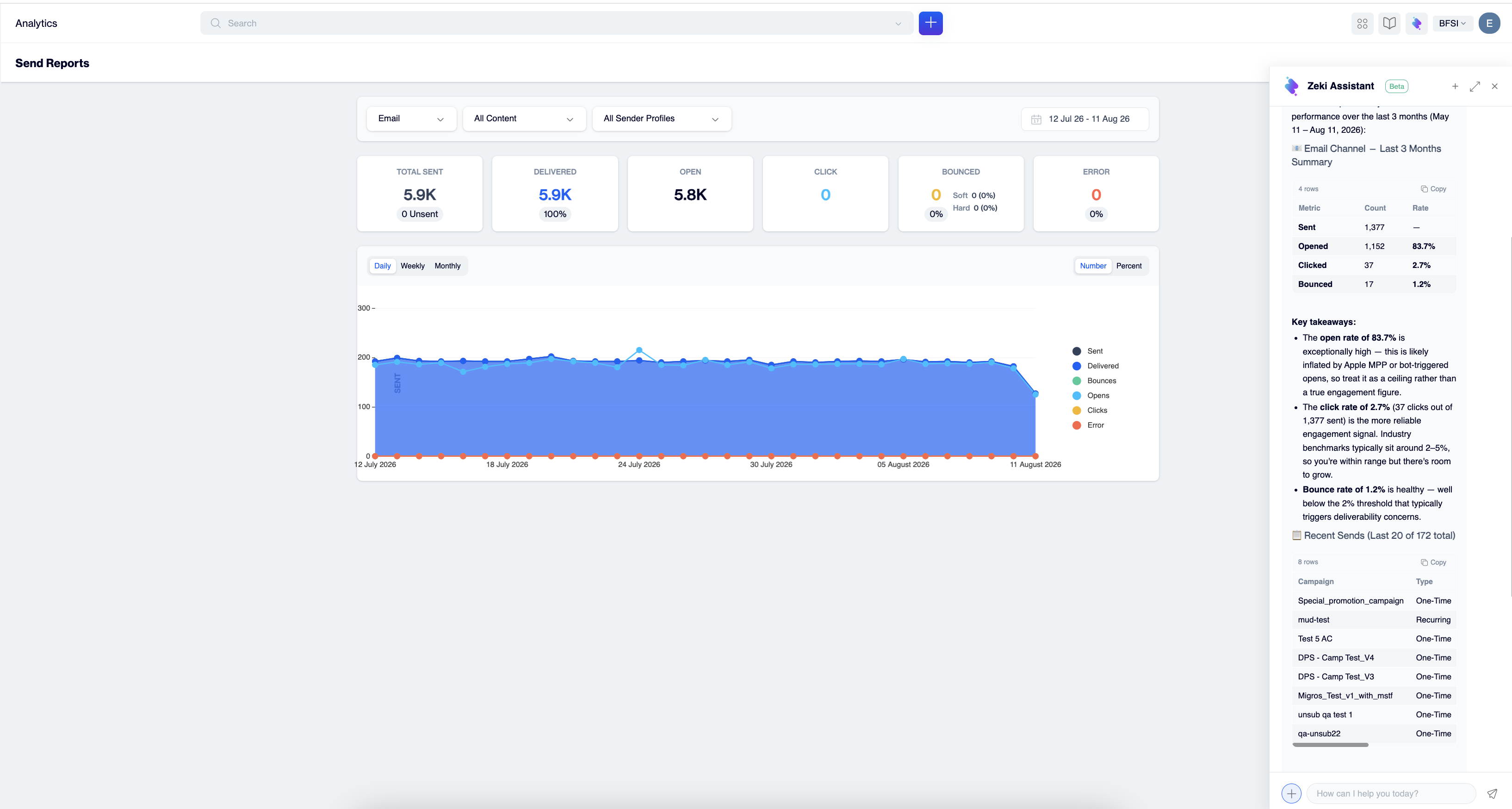
One click on 'Yes, take me' and Zeki opens the Analytics Send Report
Generate Content
Zeki turns a plain-language brief into campaign copy, notification content, or message variations in your brand's tone. You start from a draft instead of a blank page.
How it works:
- Describe what you need: the channel, the offer, the tone, and how many variations you want.
- Zeki replies with a short plan that lists the offer, tone, call to action, and any assumptions. Select Approve & generate, or reply with the changes you want.
- Zeki generates the content and shows a preview in the chat. Select Open in Editor to review, edit, and save it like any other content.
- Zeki may suggest a next step, such as building the audience for the message.
Try asking:
- "Write 3 short push variations announcing our summer sale, 20% off everything, with a clear call to action."
- "Write an email subject line and preheader for our back-to-school campaign."
- "Draft a friendly SMS reminder for customers who left items in their cart."
TipFor content that sounds like your brand from the first draft, set up your AI Brand Persona before you start.
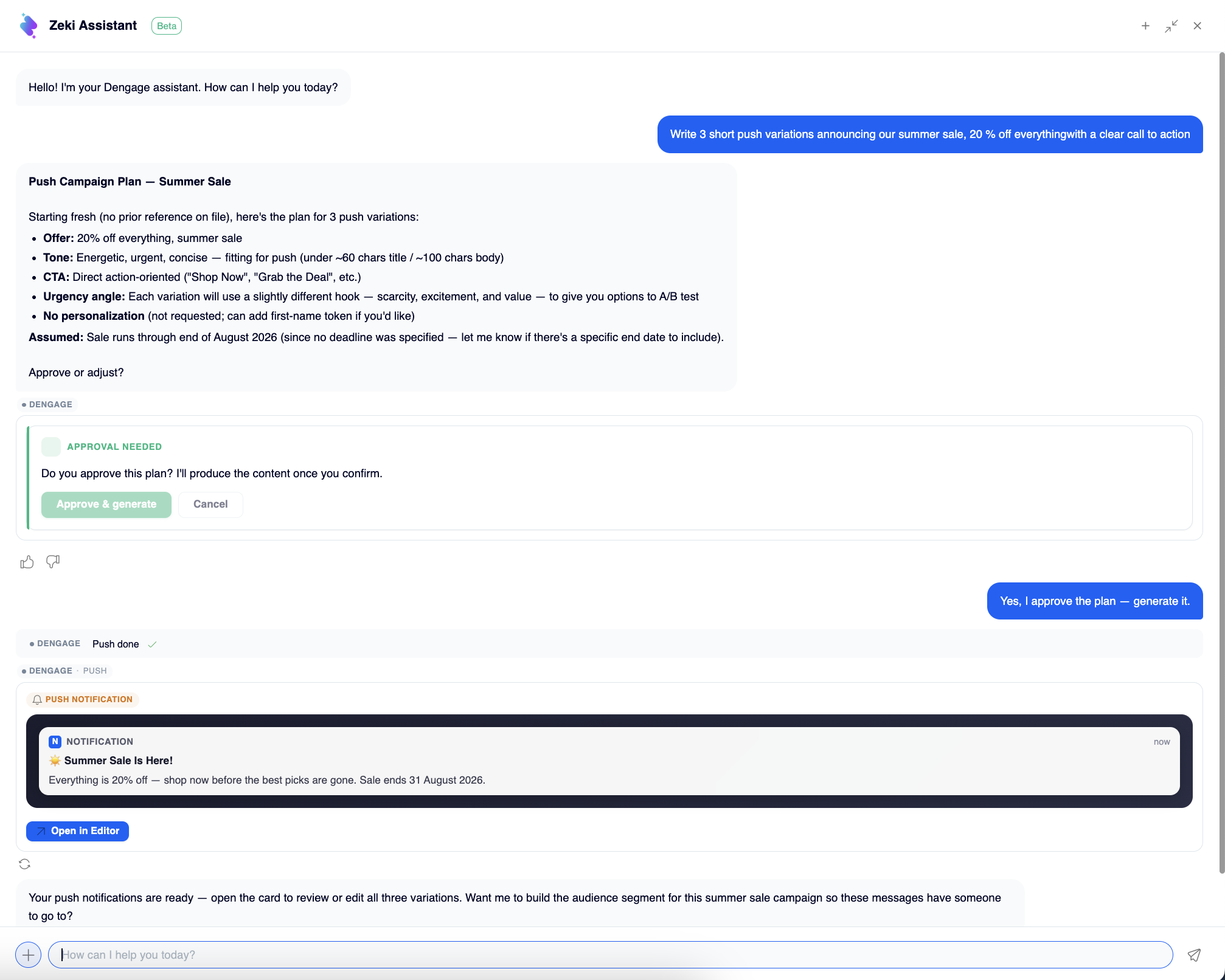
Brief Zeki the way you would brief a copywriter
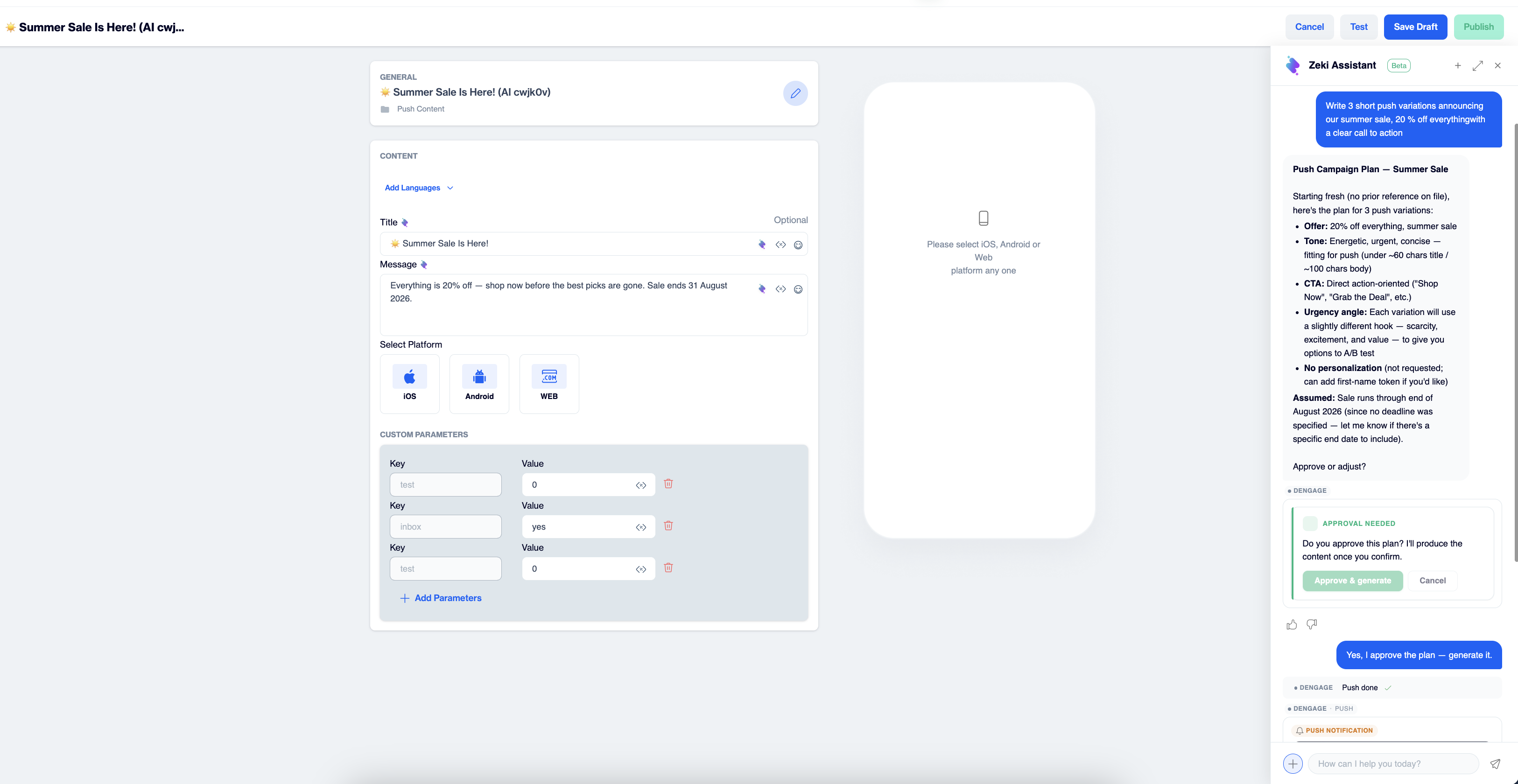
Three ready-to-use push variations, each with a clear call to action, review, and publish in minutes
Build a Segment from a Description
Zeki turns a one-sentence description of your audience into a ready-to-use segment definition. You do not build a single filter by hand.
How it works:
- Describe your audience in one sentence.
- Zeki returns a segment card with the include and exclude rules it derived from your description.
- Select Open in Editor. The segment opens in the segment editor with the filters in place.
- Review the filters, then select Save and Calculate. Zeki saves nothing until you do.
Try asking:
- "Create a segment of users who have not made a purchase in the last 30 days but have opened the app."
- "Build a segment of customers who placed at least two orders in the last 90 days."
- "Create a segment of contacts who opened an email in the last 7 days but did not click."
Prefer to start in the segment builder?Segment Shaper does the same job from Audience > Segments. See Zeki AI Overview.
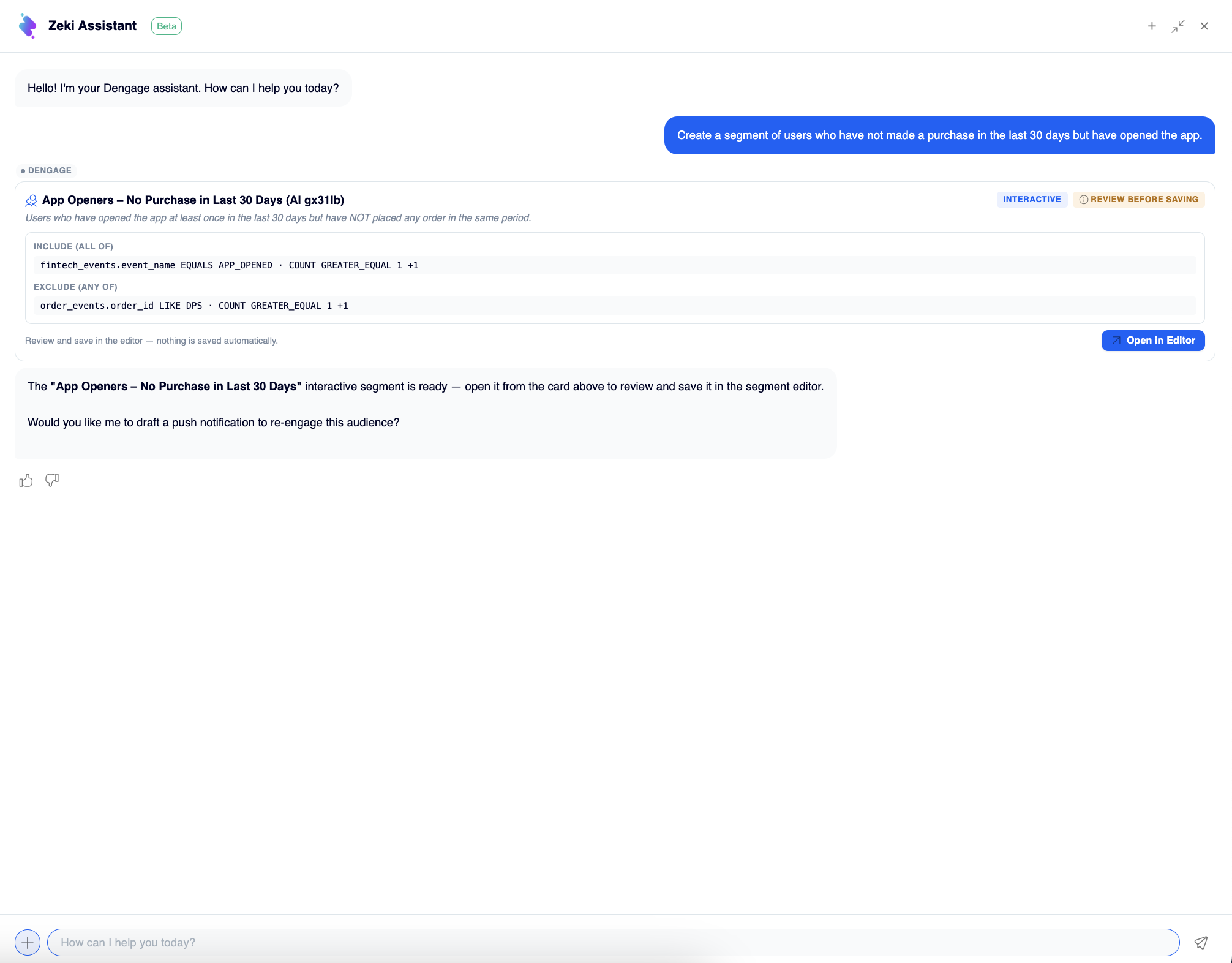
Describe your audience in one sentence
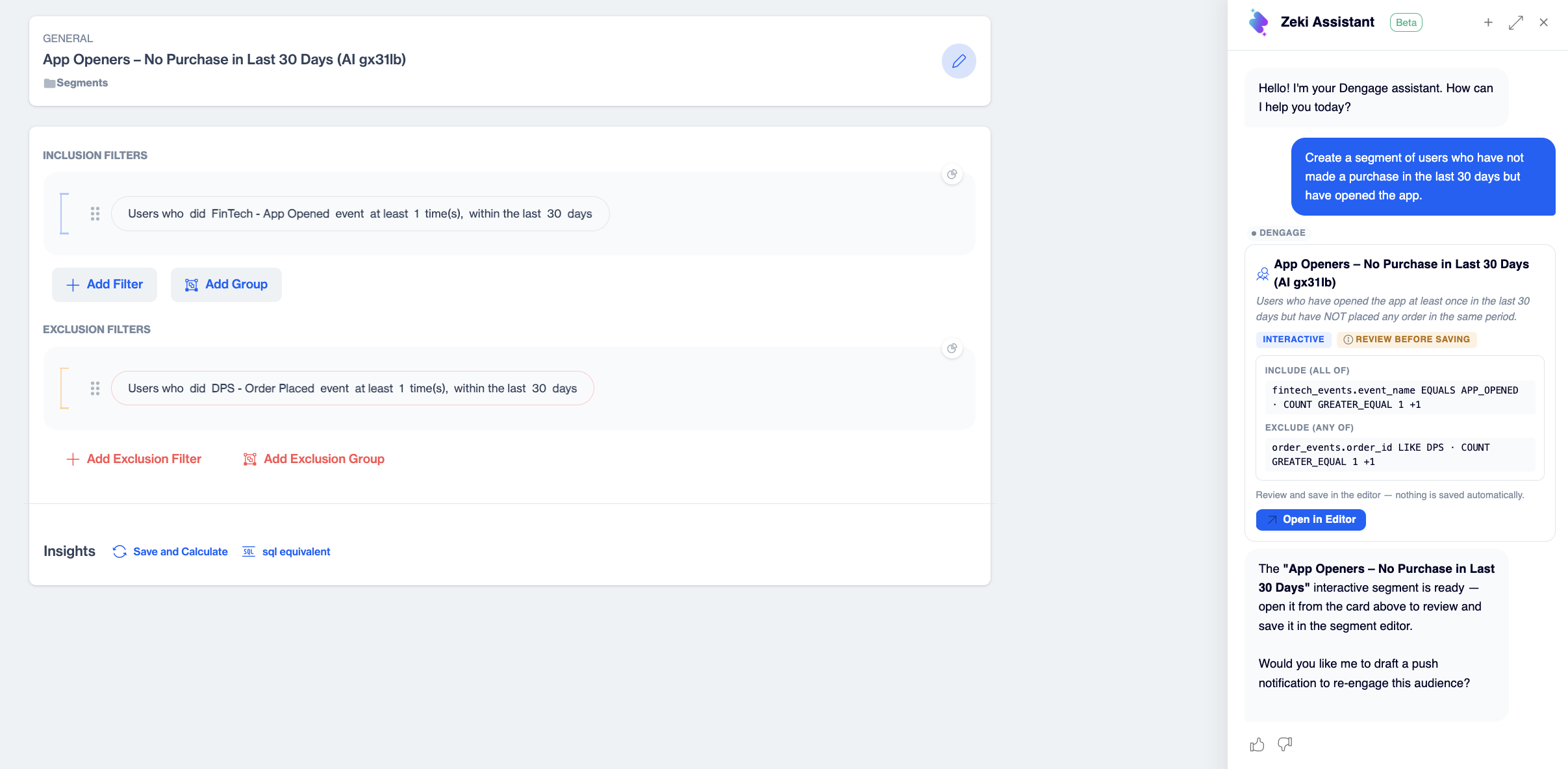
Zeki AI turns the sentence into a ready-to-use segment definition in seconds
Set Up a Campaign in One Step
One-step campaign setup brings these capabilities together. Tell Zeki Assistant the channel, the audience, the content, and the timing, and it prepares the whole campaign for you. Share everything in one message, or answer Zeki's questions step by step. If a detail is missing, Zeki asks for exactly what it needs. No separate setup screens, no switching between pages.
What Zeki gathers to build your campaign:
| Detail | Example |
|---|---|
| Channel | One channel per campaign |
| Audience | "the Email active audience segment" |
| Content | "Summer sale starts today! 20% off everything." |
| Timing | "tomorrow at 10:00" |
How it works:
- Zeki drafts the message content and shows a preview. Select Open in Editor to review and save it, or choose Skip for now and save it later.
- Zeki shows the campaign plan: channel, audience, content, and schedule. Select Approve plan, or Change to adjust a detail.
- Zeki opens the campaign in the campaign editor as a ready-made flow, with your audience, the channel step, and the schedule in place.
- Review the flow, then save it as a draft or publish it, as you would with any campaign.
Try it like this:
- Everything at once: "Create an SMS campaign for the Email active audience segment with the message 'Summer sale starts today! 20% off everything.' Send it tomorrow at 10:00."
- Step by step: "Set up an email campaign for my VIP customers." Zeki asks for the content and timing, then prepares the rest.
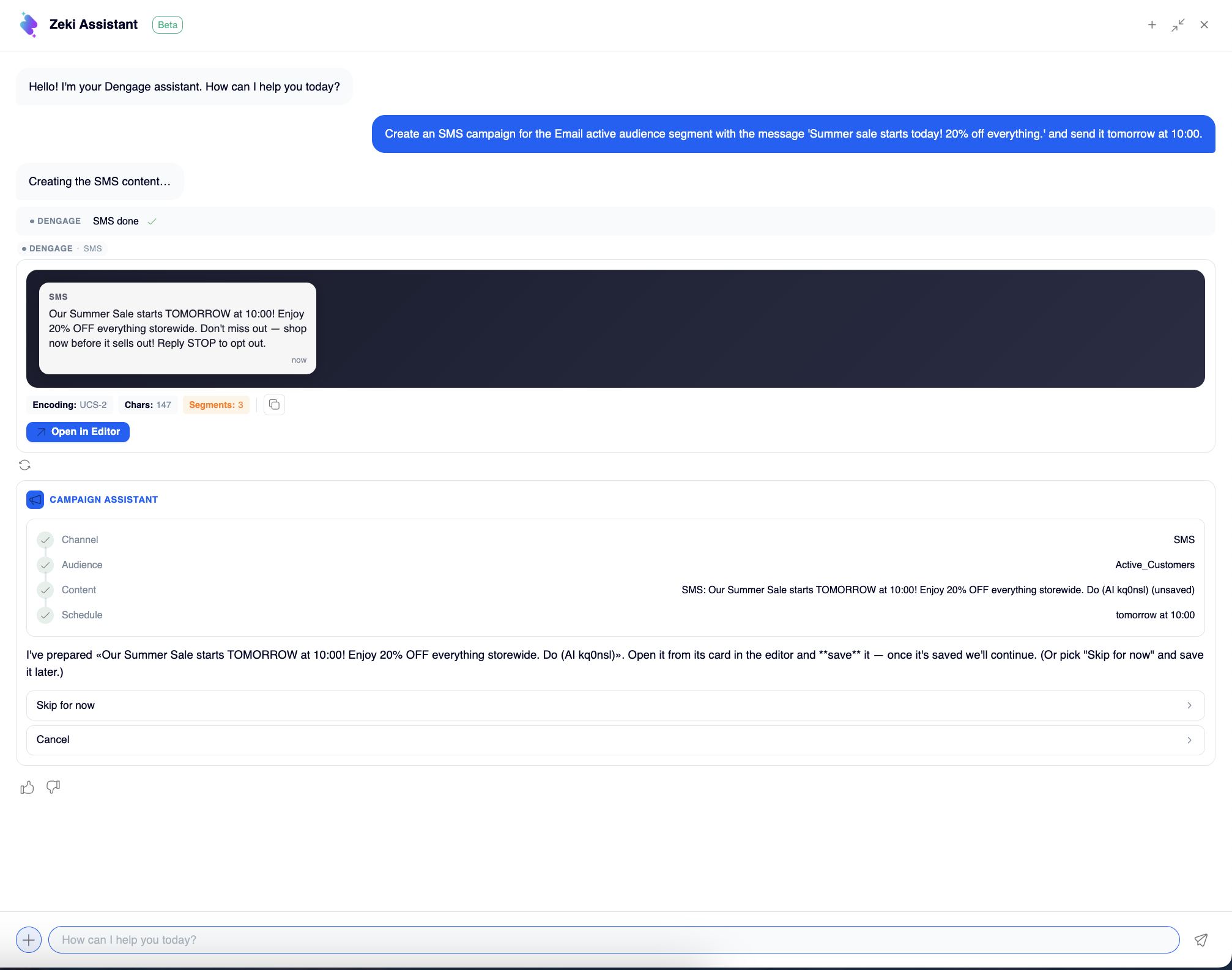
Create your campaign with a single message
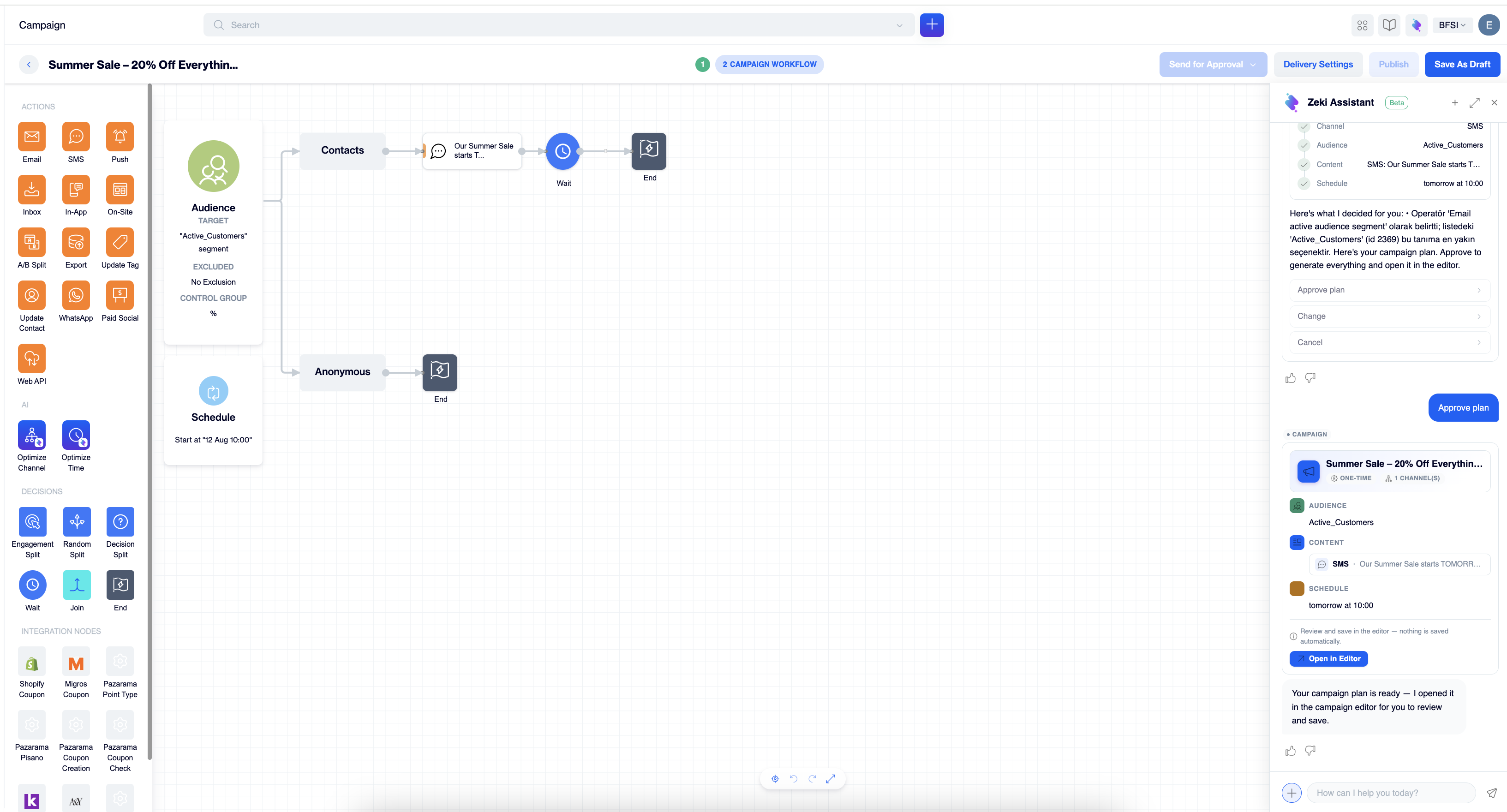
Your campaign, built as a single-node flow, nothing configured by hand
Good to Know
- You stay in control. Zeki Assistant prepares content, segments, and campaigns, but it does not save or send anything on its own. You review and confirm each result in the editor.
- Answers come from your account. Insights reflect the data in your account at the time you ask, so the same question can return different numbers on different days.
- Each session is a fresh start. Zeki keeps context within a session. Select + when you move to a new task, so earlier requests do not shape the next answer.
Tips for Better Results
- Be specific. Include the channel, time frame, or segment name. "How did my SMS campaigns perform last month?" gets a sharper answer than "How are my campaigns?"
- Ask follow-ups. Zeki keeps the context of your session, so you can drill down: "Which of those had the most bounces?"
- Use the extended view for data. Tables and breakdowns are easier to read in the wider panel.
- Use the shortcut cards. When Zeki offers to open a screen, one selection takes you from insight to action.
- Review before you publish. Read AI-generated copy and segment rules the way you would review a colleague's work.
Updated about 1 month ago