
E-Mail Web Preview
E-Mail Web Preview allows you to add a View as Webpage link to your email content so recipients can view the email correctly in a web browser.
If an email is rendered incorrectly or incompletely by certain email clients (such as Outlook, Gmail, mobile apps, dark mode, or when images are blocked), recipients can click this link to open a web page displaying the exact HTML snapshot of the sent email.
How to Access
You can insert the View as Webpage link while creating email content in any email Editor.
Content > Marketing > Email > New > Any Email Editor
NoteE-Mail Web Preview does not have a feature flag of its own. It is tied to the email marketing send log flag; the View as Webpage link is available when that flag is enabled for the account.
How to Use
- Go to Content > Marketing > Email.
- Click New and enter the general information for your email (name, description, etc.).
- Click Next to open the Editor.
- In the editor toolbar, click Insert.
- Select View as Webpage.
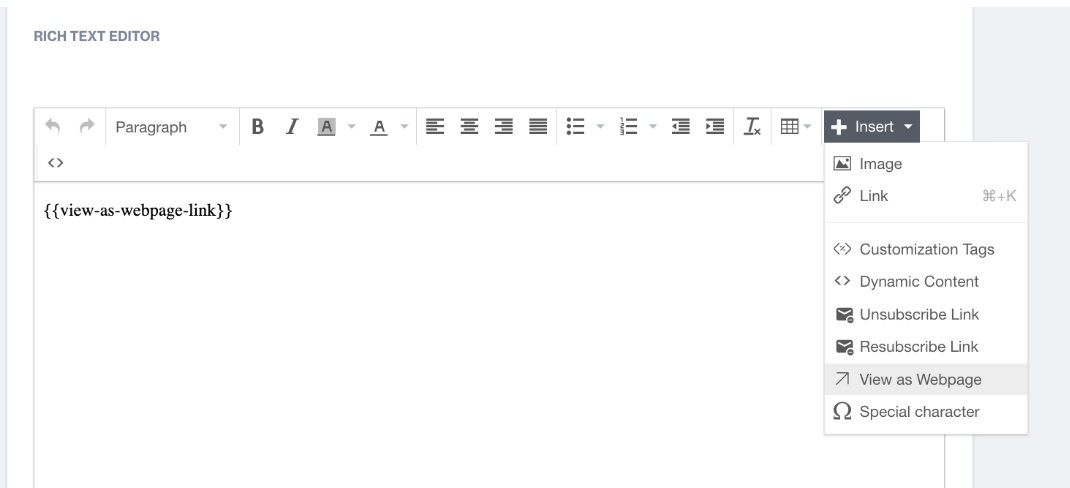
View as Webpage
- The system inserts the placeholder.
- Place the link in your email content (for example, at the top of the email).
When the email is sent, this placeholder is automatically replaced with a working View as Webpage link.
E-Mail Web Preview ensures that your email content is always accessible and displayed correctly, regardless of email client limitations. This improves the recipient experience and reduces the risk of broken or unreadable emails.
Updated 1 day ago