
Channel Based Skip Permission
Skip Permission allows you to send campaign messages without checking user permissions for selected channels.
Previously, Skip Permission was applied at the campaign level without channel separation. With this enhancement, you can now decide which channels should skip permission checks within the same campaign. This gives you more flexibility and control.
Skip Permission can be used for Email, SMS, Push, and WhatsApp. However, SMS has additional handling because messages are sent through providers and must be marked as informational on the provider side.
Prerequisites
Skip Permission is not enabled by default. To use this feature:
- The feature flag must be activated.
- A specific agreement or contractual approval may be required.
How to Access
Skip Permission is available during campaign creation and editing. You can find it under the campaign settings related to permissions.
Navigate to Campaign Settings > Delivery Settings > Skip Permission.
How to Use
To use Skip Permission, open your campaign and go to the delivery settings section. Turn on the Skip Permission toggle to enable the feature at the campaign level.
Once enabled, you can select which channels Skip Permission should apply to. This selection is important because Skip Permission only affects the channels you choose. All other channels will continue to perform permission checks as usual.
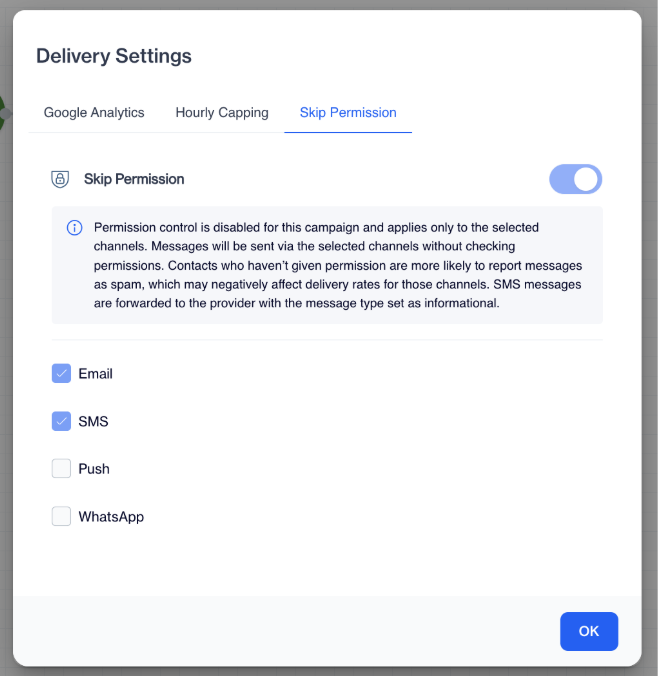
Skip Permission
If you enable Skip Permission for SMS, the system will not check consent or opt-in information before sending. The message will be sent to the SMS provider as an informational message.
If Skip Permission is enabled for other channels, permission checks are skipped and the campaign is sent using the existing delivery logic.
What Happens When the Campaign Is Sent
When the campaign is triggered, the system checks Skip Permission settings for each channel separately. For channels where Skip Permission is enabled, permission checks are bypassed. For channels where it is not enabled, the standard permission logic continues to apply.
For SMS sends, the system also sets the message type to informational at the provider side. All sending results are logged, ensuring the campaign activity can be reviewed later.
Skip Permission gives you flexible, channel-based control over consent checks within a campaign. Once activated for your account, you can decide per channel whether to apply or bypass permission control, while the system automatically handles SMS provider requirements.
Updated 3 months ago