
Segment Versioning
Segment Versioning allows you to view and inspect historical versions of Interactive and SQL segments directly from the segment detail screen.
This helps you understand which segment logic was active at a specific point in time, making it easier to analyze past campaigns and flows that were triggered based on that segment.
By default, only the current version is editable. Previous versions are preserved and displayed in read-only mode for reference.
How Segment Versioning Works
On the segment detail page, a version selector is displayed near the header. By default, the Current Version is shown. When you select a historical version, the segment definition updates to reflect the selected version and opens in read-only mode. For each version, the creation date and time is displayed to help you identify when that version was active.
How to Access
- Navigate to Audience from the main menu
- Click Segments
- From the segment list, select an Interactive or SQL segment
Viewing Segment Versions
- Open the selected segment
- At the top of the segment screen, locate the Current Version dropdown
- Click the dropdown to view all available versions
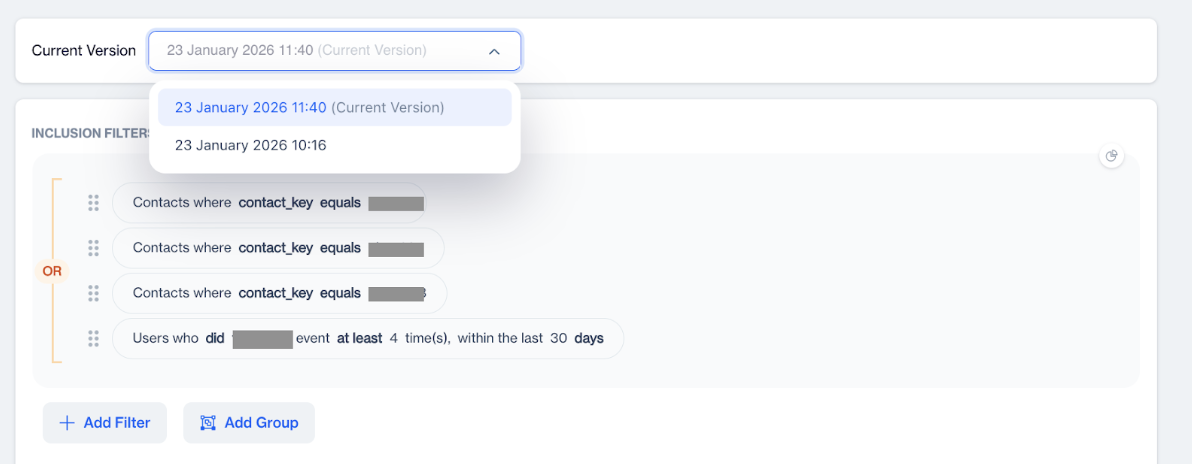
Segment Versions
- Each version is listed with its creation date and time
- Select a version to view the corresponding segment definition
Segment Versioning provides better visibility into how audiences were defined over time, making it easier to analyze campaign behavior and troubleshoot past executions.
Updated 3 months ago