
Roles And Permissions
Roles and Permissions are the core of user security on the platform.
Roles and permissions control what each user can see and do on the Dengage platform. A role is a named set of permissions. When you assign a role to a user, the user gets exactly the access that the role grants: nothing more, nothing less.
Well defined roles protect sensitive data, such as personally identifiable information (PII), and let each team member work without unnecessary barriers or risky extra access.
Where to find itGo to Settings > Identity & Access Management > Roles and Permissions.
The Roles and Permissions screen
The screen lists every role in your account. For each role, the list shows:
| Column | What it shows |
|---|---|
| Name | The role's name, for example Campaign Manager. |
| Description | A short explanation of the role's purpose and responsibilities. |
| Type | System Role for the roles Dengage predefines, such as Full Admin and No Access. User Defined for the roles your team creates. |
| Created At | The date and time someone created the role. |
Use the search box to find a role by name. Use the three dot menu at the end of a row to Edit or Delete a user defined role.
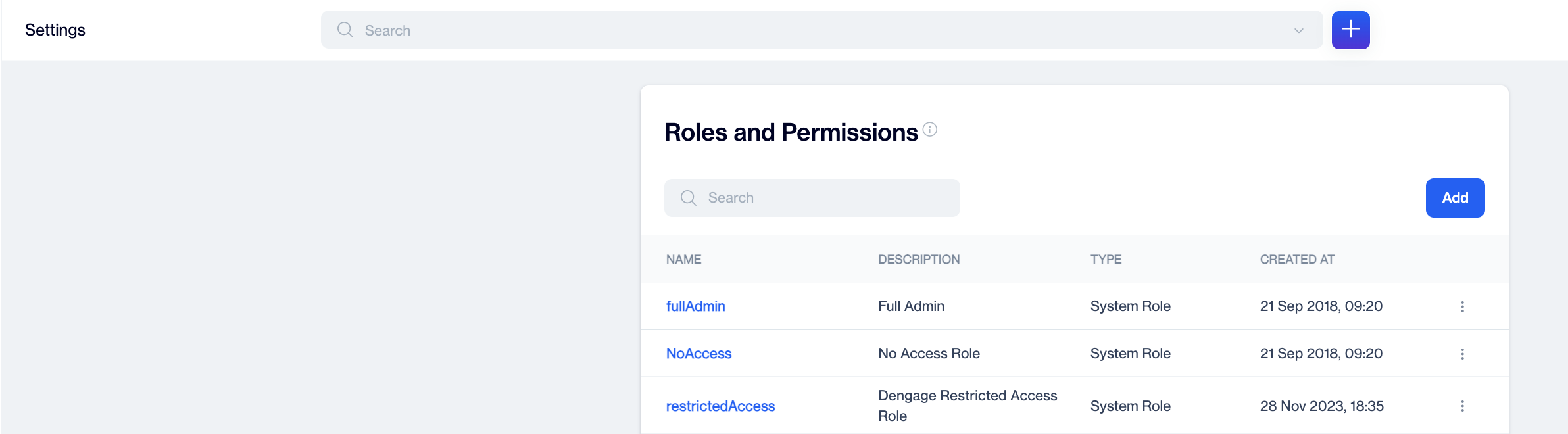
the Roles and Permissions list
Limit the Full Admin roleAssign the Full Admin role only when absolutely necessary. It grants every permission on the account.
Create a role
- Go to Settings > Identity & Access Management > Roles and Permissions.
- Click Add. The New Role window opens.
- Enter a Name that describes the job the role serves, for example Campaign Manager.
- Enter a Description so other administrators understand the role's purpose.
- Turn on the permissions the role needs. The Permission reference below explains every switch.
- Click Save.
Select at least one permissionA role needs at least one permission. If every switch is off, the screen shows "Please enable at least 1 permission" and does not save the role.
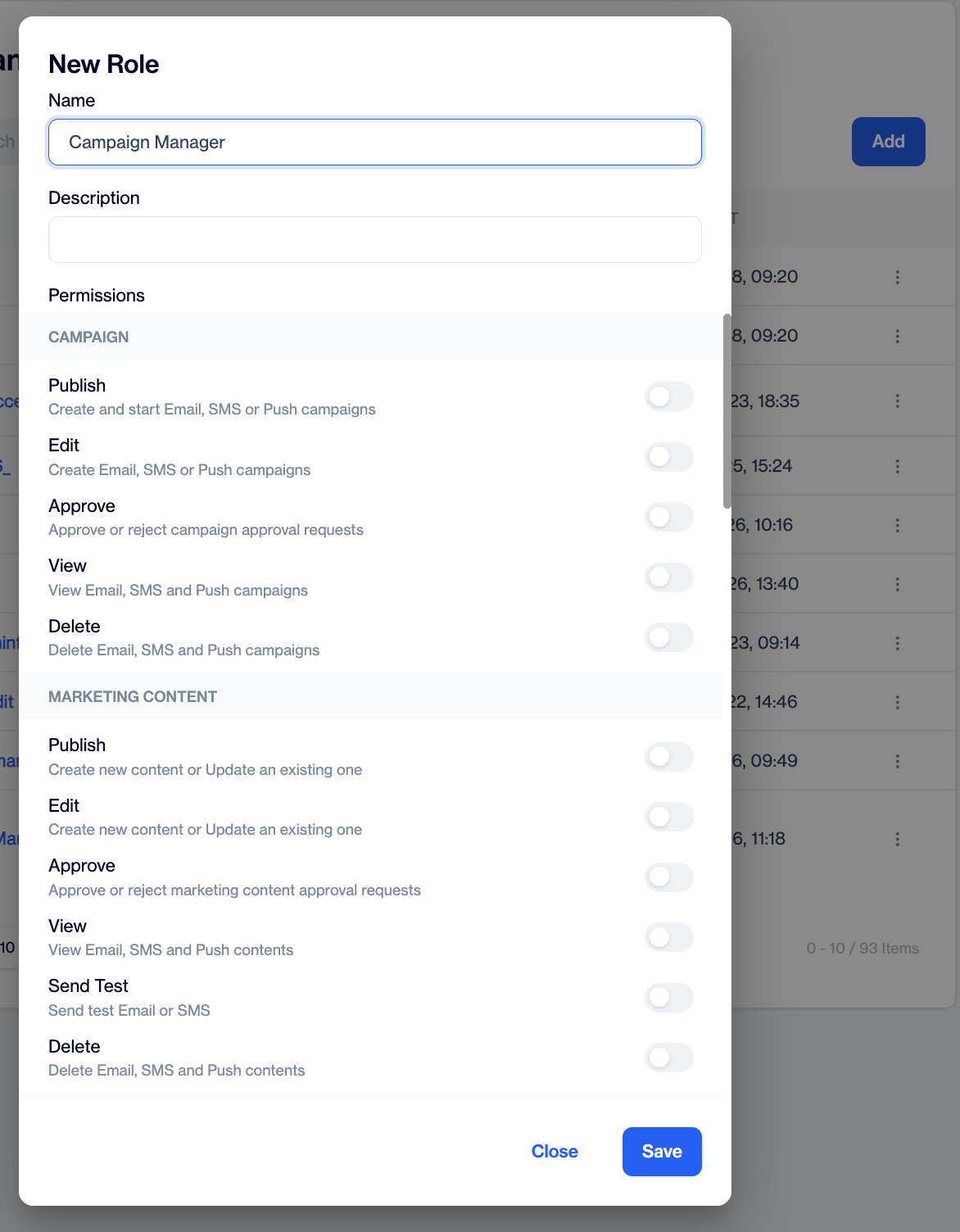
New Role window with the Campaign and Marketing category visible
Assign a role to a user
- Create the role that fits the user's job.
- Go to Settings > Identity & Access Management > Users and create or invite the user.
- Select the role for the user.
The user signs in with that role and inherits its permissions. To change a user's access later, open the Users page and select a different role for them.
Permission reference
The New Role window groups permissions into the categories below. Each switch turns one capability on or off for the role.
Campaign
Campaign permissions control access to the Campaign module for Email, SMS, and Push campaigns.
| Permission | When on | When off |
|---|---|---|
| View | The user views the campaign list and campaign details. | The user cannot open the Campaign module. |
| Edit | The user creates and edits campaigns. | The user only views campaigns. |
| Publish | The user publishes and sends draft campaigns. | The user prepares campaigns but cannot start them. |
| Approve | The user approves or rejects campaign approval requests. | The user cannot act on approval requests. |
| Delete | The user deletes campaigns. | The user cannot delete campaigns. |
Approve works together with Approval WorkflowsThe Approve permission applies to accounts that use the Approval Workflow feature. To review submissions, the user also needs an approval level under Settings > Approval Workflows. The Approve switch alone is not enough.
Marketing Content and Transactional Content
The New Role window lists Marketing Content and Transactional Content as two separate categories with the same set of switches. Turn them on independently: one set for marketing content and templates, one set for transactional content.
| Permission | When on | When off |
|---|---|---|
| View | The user views Email, SMS, and Push contents and templates. | The user cannot open the Content module. |
| Edit | The user creates new content and updates existing content. | The user only views content. |
| Send Test | The user sends test Email or SMS messages. | The user cannot send test messages. |
| Publish | The user publishes content. | The user prepares content but cannot publish it. |
| Approve | The user approves or rejects content approval requests. | The user cannot act on approval requests. |
| Delete | The user deletes content. | The user cannot delete content. |
Analytics
Analytics permissions control access to reporting screens.
| Permission | When on | When off |
|---|---|---|
| Tracking | The user views tracking information for sends: opens, clicks, unsubscribes, and similar data. | The user cannot open tracking data. |
| Insights | The user views Insights and reports on sends. | The user cannot open Insights screens. |
| Advanced Analytics | The user creates custom reports and views all reports. | The user cannot open Advanced Analytics screens. |
General
General permissions control account administration: user management, account settings, and configuration screens.
| Permission | When on | When off |
|---|---|---|
| Invite User | The user invites new users by email. | The user cannot send invitations. |
| Manage Users | The user changes the role of a user and manages existing users. | The user cannot open User Management. |
| Manage Roles | The user defines new roles and manages role properties. | The user cannot open the Roles and Permissions screen. |
| Change Account Settings | The user changes account settings and KPIs. | The user cannot change account settings. |
| Campaign Configurations View | The user views campaign configurations: Blackout, Channel Optimization, Content Languages, Custom Params, and Revenue Mapping. | The user cannot open these screens. |
| Campaign Configurations Edit | The user edits campaign configurations. | The user only views them, if the View switch is on. |
| Identity Access Management View | The user views Identity & Access Management settings. | The user cannot open these settings. |
| Identity Access Management Edit | The user edits Identity & Access Management settings. | The user only views them, if the View switch is on. |
| Integrations View | The user views the integrations page. | The user cannot open it. |
| Integrations Edit | The user connects and disconnects integrations. | The user only views them, if the View switch is on. |
| Global Frequency Capping | The user changes the account's Global Frequency Capping settings. | The user cannot change these settings. |
Example: view only access to settingsA marketing manager needs to check campaign configurations but must not change account level settings. Turn on Campaign Configurations View and leave Campaign Configurations Edit, Change Account Settings, and the other edit switches off. The manager reviews the setup and cannot change it.
Data Space
Data Space is the area of the platform that stores your data tables, segments, and contact records. Data Space permissions control who works with that data.
| Permission | When on | When off |
|---|---|---|
| View Segment/Table | The user views data tables and segment definitions. | The user cannot open table or segment definitions. |
| View Data | The user views the records stored in tables. | The user cannot view stored records. |
| Manage Segment | The user creates and edits segments. | The user cannot create or edit segments. |
| Manage Table | The user creates tables and adds or edits columns. | The user cannot create or edit tables. |
| Manage Table Relations | The user creates and deletes table relations. | The user cannot define or change relations. |
| Change Contact Data | The user manually adds, edits, and tags contact records. | The user cannot change contact data. |
| Import Data | The user uploads data to tables or creates tables with data. | The user cannot import data. |
| Export Data | The user exports or downloads data from tables and segments. | The user cannot export data. |
| Show PII Data | The user views the actual values of personal data columns. | The user sees masked values (***). |
Example: select segments without viewing dataSome team members only pick target segments for campaigns and do not need to see the records behind them. Turn on View Segment/Table and leave View Data off. The user selects existing segments and the stored data stays hidden.
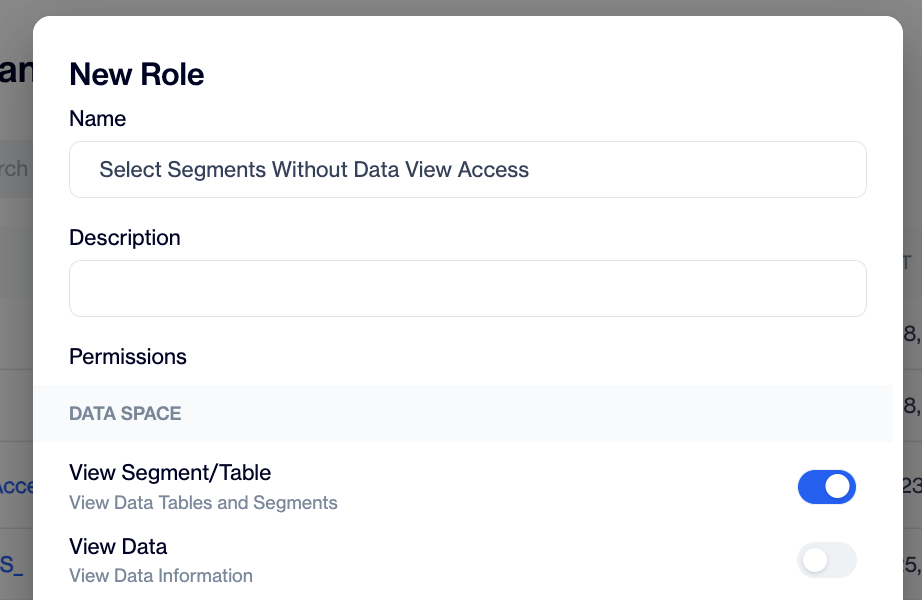
Role with View Segment/Table on and View Data off lets the user select existing segments without opening the records
PII and masked columnsPII stands for personally identifiable information, such as email addresses and phone numbers. An administrator marks the personal data columns on the PII Masking screen (Settings > Identity & Access Management > PII Masking). After that, only users with Show PII Data view the actual values; everyone else sees masked values. This switch also affects the table and column creation screens: without it, the user cannot see or select column types that contain personal data (TEXT, EMAIL, PHONE, JSON). See PII Masking for details.
Data Space Automated Flow
| Permission | When on | When off |
|---|---|---|
| View | The user views automated flows in Data Space. | The user cannot open automated flows. |
| Manage | The user creates new automated flows and updates existing ones. | The user cannot create or change automated flows. |
Coupon
| Permission | When on | When off |
|---|---|---|
| View | The user views coupon lists and codes. | The user cannot open the Coupon module. |
| Manage | The user creates and edits coupon lists. | The user only views coupons. |
Updated about 2 months ago